






버전 관리
- Git의 가장 큰 장점 중 하나
- 실수로 파일을 변경했을 때 이전 상태로 변경이 가능
- 단 한번 돌아가면 다시 되돌리기 어렵기 때문에 주의가 필요함
- 단 기능 추가가 목적인 branch를 이용한 버전 관리와는 차이가 있음
commit history 조회
git log: commit history 시간 순으로 보여줌-
git log -p -<n>git log --stat: git diff 내용을 포함한 history를 보여주나 GitHub나 tool을 통해 보는게 정신적으로 좋음$ git log --pretty=oneline ca82a6dff817ec66f44342007202690a93763949 changed the version number 085bb3bcb608e1e8451d4b2432f8ecbe6306e7e7 removed unnecessary test a11bef06a3f659402fe7563abf99ad00de2209e6 first commit git log --pretty=<option>oneline: 스냅샷 commit_massage 형태로 출력. commit massage를 재대로 작성해야 하는 이유 중 하나
  $ git log --pretty=format:"%h - %an, %ar : %s"
  ca82a6d - Scott Chacon, 6 years ago : changed the version number
  085bb3b - Scott Chacon, 6 years ago : removed unnecessary test
  a11bef0 - Scott Chacon, 6 years ago : first commit
$ git log --pretty=format:"%h %s" --graph * 2d3acf9 ignore errors from SIGCHLD on trap * 5e3ee11 Merge branch 'master' of git://github.com/dustin/grit |\ | * 420eac9 Added a method for getting the current branch. * | 30e367c timeout code and tests * | 5a09431 add timeout protection to grit * | e1193f8 support for heads with slashes in them |/ * d6016bc require time for xmlschema * 11d191e Merge branch 'defunkt' into localformat: 원하는 옵션으로 출력.범인 찾기 할 때 유용할 듯
-
되돌리기
특정 commit으로 되돌리기
git commit --amend- 마지막 stage 상태로 복귀
- 마지막 stage 이후 변경 내용은 삭제되므로 주의해서 사용해야 함
$ git checkout 59739ad
Note: switching to '59739ad'.

You are in 'detached HEAD' state. You can look around, make experimental
changes and commit them, and you can discard any commits you make in this
state without impacting any branches by switching back to a branch.

If you want to create a new branch to retain commits you create, you may
do so (now or later) by using -c with the switch command. Example:

  git switch -c <new-branch-name>
Or undo this operation with:

  git switch -

Turn off this advice by setting config variable advice.detachedHead to false

HEAD is now at 59739ad add commit1
git checkout <해시 앞 7자리>- 해당 commit으로 복귀
- 중간 commit으로도 복귀가 가능하나 log는 사라지므로 주의
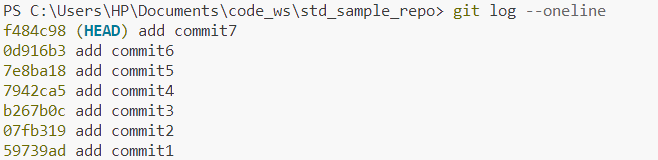

- commit7 → commit1으로 변경 : commit2 - commit7 history 삭제
파일 상태를 Unstage로 변경
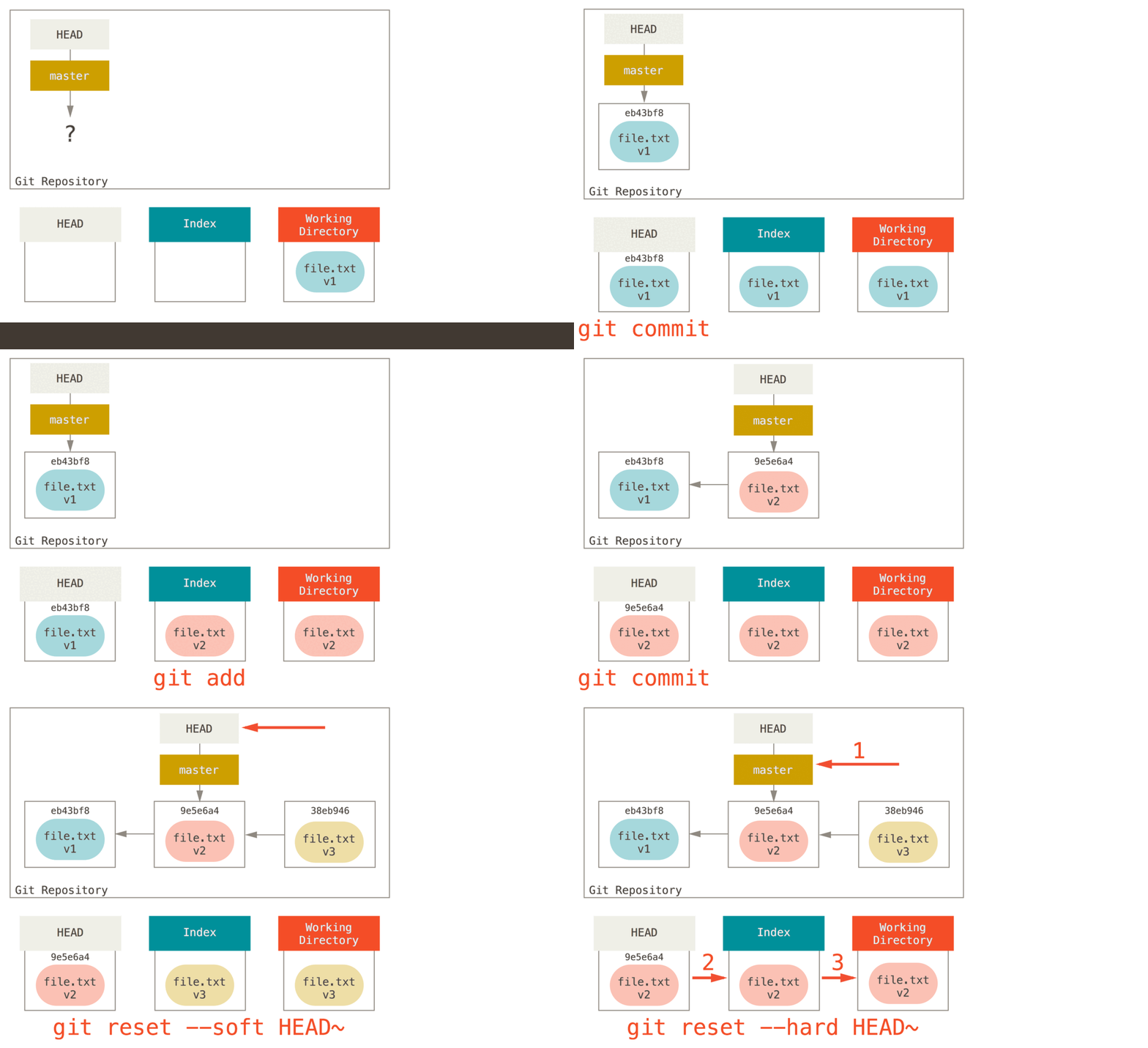
- Stage → Unstage 상태 변경(git add 취소)
- 3가지 버전 soft, mixed, hard
- reset의 endpoint(버전)를 HEAD, Indx, Working Directory 중 어디로 정하는지에 따라 다름
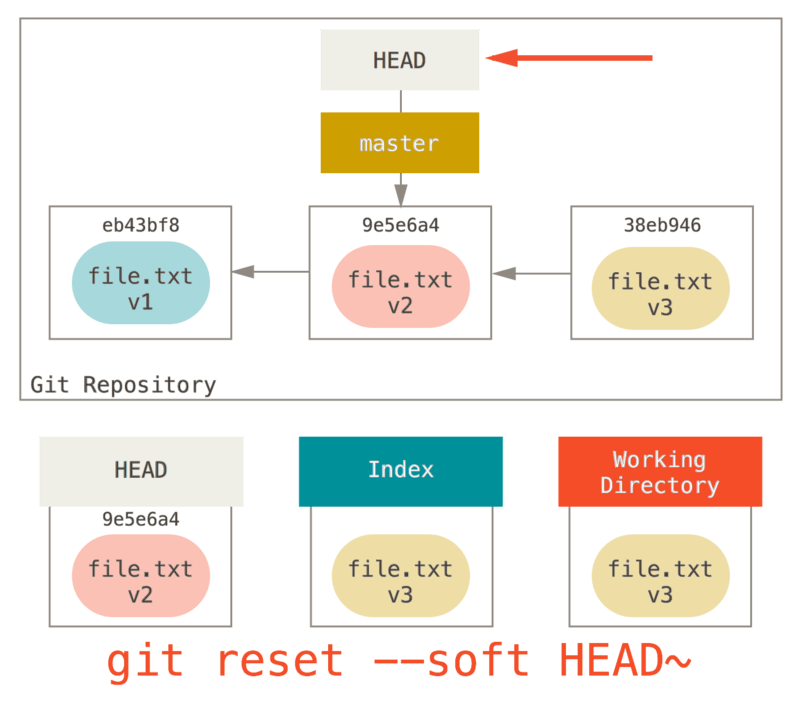
reset soft
- HEAD의 commit만 변경
- 다시 commit을 통해 reset 이전 상태로 복귀 가능
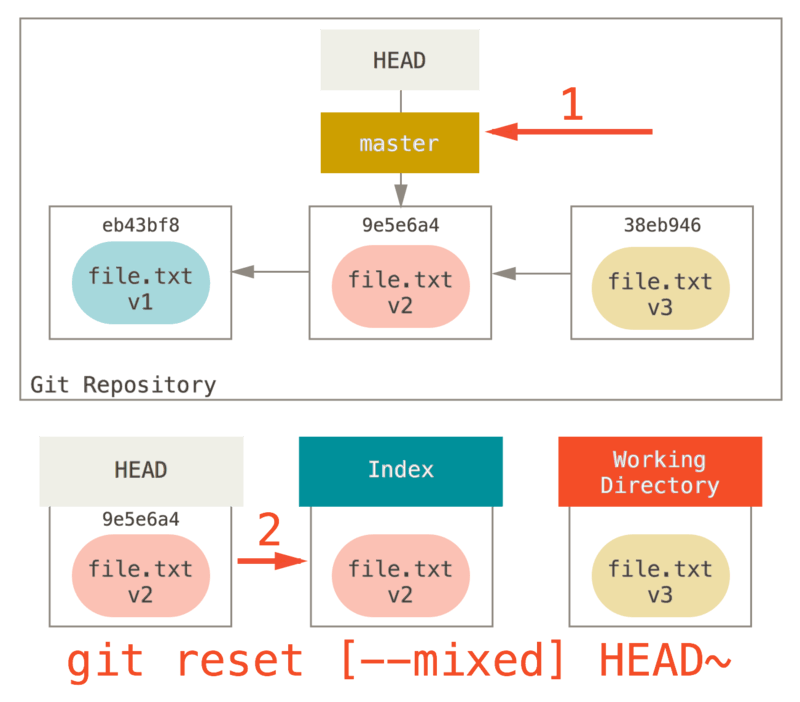
mixed(default)
- HEAD와 Index까지 commit 변경
- 즉 commit과 add 명령 되돌린 상태
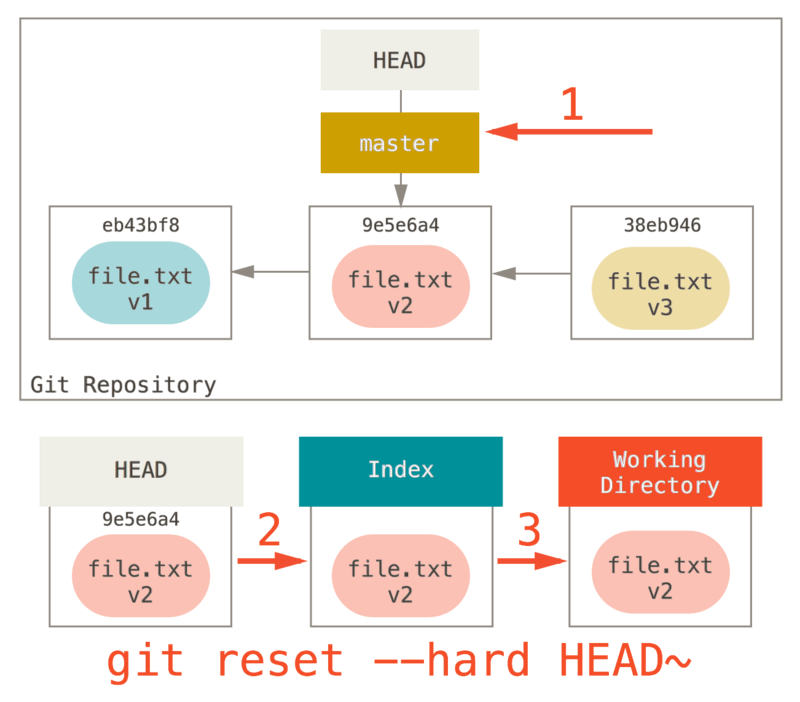
hard - 주의가 필요한 작업
- HEAD, Index, Working Directory 전부 변경
- 실제 파일 내용이 변하므로 주의가 필요한 작업
git reflog를 사용하면 일부 복구 가능할 수도 있음


C
Contents